
Google My Business Website SEO: A Practical Guide to Better Local Visibility
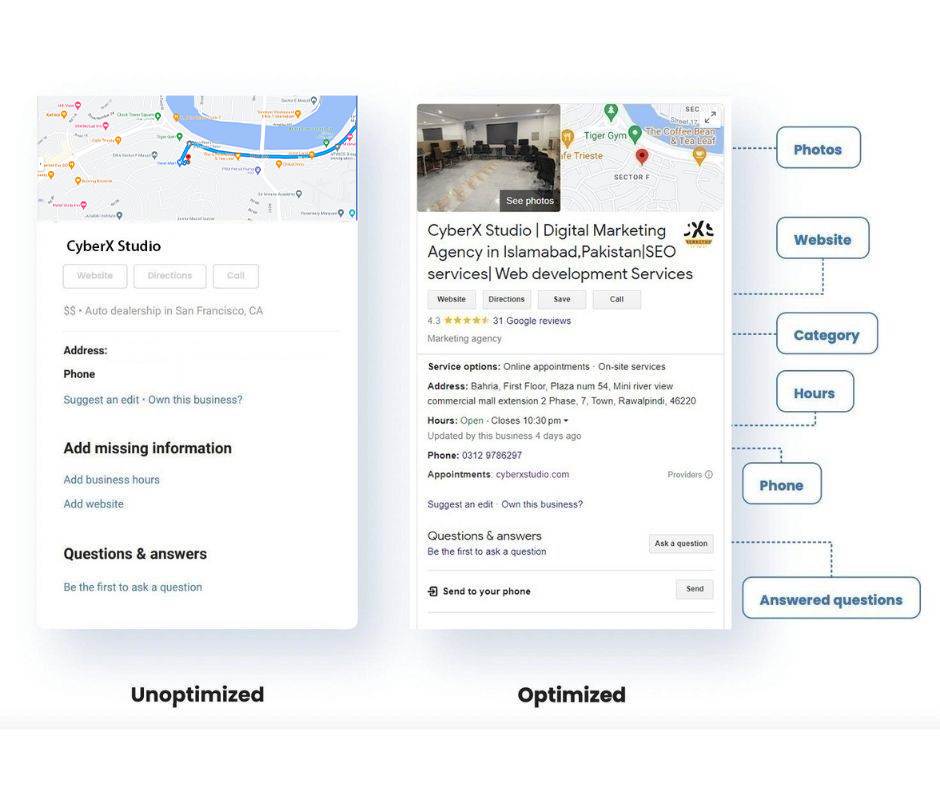
Google My Business Website SEO: How to Improve Your Local Visibility
Google My Business is now called Google Business Profile. Many businesses still use the old name when looking for ways to improve their local search visibility. While your Business Profile and website are separate, they work together: a well-maintained profile can help customers find your business, and a useful, locally optimised website can give them the information they need to choose you.
There is no single setting that guarantees a higher position in Google Search or Maps. Local results are influenced by factors including relevance, distance and prominence. The steps below can help make your business information clearer and strengthen your website’s local SEO.
Complete and maintain your Google Business Profile
Start by claiming and verifying your profile, then check that the details are accurate and consistent with your website. Add your business name, address or service area, phone number, opening hours, website link and the most relevant business category.
Choose categories that genuinely describe what your business does. Avoid adding keywords to your business name unless they are part of its real-world name. Keep your hours up to date, including special opening times, and use the services or products sections where they are available and relevant.
Make your website details consistent
Your website should show the same core business information as your profile. This is often called NAP consistency: name, address and phone number. If your business serves customers at a physical location, make the address easy to find. If you work across a service area, explain where you operate without implying that you have an office in places where you do not.
Include a clear contact page with your preferred contact methods, opening hours and any relevant location details. Consistent information helps customers and search engines understand which business the website represents.
Create useful local landing pages
If your business serves several locations, create a dedicated page for each genuine location or service area where you have a meaningful presence. Each page should offer useful, original information, such as services available, local contact details, directions or examples of relevant work.
Avoid publishing many near-identical pages that only swap one town name for another. Thin or repetitive pages offer little value to visitors. For a single-location business, a strong location or contact page may be more useful than creating multiple pages for nearby areas.
Optimise website content for local searches
Think about the phrases customers use when looking for your services, including service names and relevant place names. Use these naturally in page titles, headings, service descriptions and image text where appropriate. The aim is to make each page clear and helpful, not to repeat keywords unnaturally.
Explain what you offer, who you serve and what makes your business a suitable choice. Specific, informative content is generally more useful than broad claims such as “the best service in town”.
Make your website easy to use on mobile
Many local searches happen on mobile phones. Make sure your website loads reliably, displays well on smaller screens and has clear navigation. Visitors should be able to call, request a quote, book an appointment or find directions without unnecessary effort.
Use descriptive links and buttons, keep forms straightforward, and ensure that important contact details are easy to locate. A fast, accessible website supports a better experience for both customers and search engines.
Add structured data where appropriate
Structured data is code that helps search engines interpret information on a page. A business may be able to use relevant LocalBusiness structured data to describe details such as its name, address, phone number and opening hours.
Only mark up information that is visible on the page and accurate. Structured data can help search engines understand your business, but it does not guarantee a special search result or improved rankings. Check your implementation with Google’s available validation tools and keep it in line with current guidelines.
Encourage genuine customer reviews
Reviews can help potential customers assess your business and may contribute to your overall prominence in local results. Invite customers to leave honest feedback after a genuine interaction, and respond professionally to reviews where appropriate.
Do not buy reviews, offer rewards in exchange for positive reviews or pressure customers to change their feedback. Follow Google’s policies and applicable consumer protection rules. A thoughtful response can show that your business takes customer experiences seriously.
Build trust and local authority
Make it easy for visitors to understand who runs the business and how to get in touch. Depending on your industry, useful trust signals may include staff profiles, qualifications, insurance details, case studies, clear policies and examples of completed work.
Accurate listings on reputable directories and relevant local or industry websites can also help customers discover your business. Focus on quality and consistency rather than submitting your details to large numbers of low-quality directories.
Link your profile to the right page
Your Business Profile’s website link should take visitors to the most relevant page. For many businesses, this will be the homepage. For a particular location or service, a dedicated page may be more helpful, provided it accurately represents the business and gives visitors a clear next step.
Use tracking parameters if you want to measure visits from your profile in analytics. Make sure the destination page works properly and does not lead to an outdated offer or broken link.
Measure results and keep information fresh
Use Google Business Profile performance data, website analytics and search performance reports to understand how people find and use your business information. Track meaningful outcomes such as calls, enquiries, bookings and visits to key pages—not just rankings or profile views.
Review your profile and website periodically. Update opening hours, services, prices and location details when they change. Remove outdated content and add new information when it will genuinely help customers.
Conclusion
Google Business Profile optimisation and website SEO are most effective when they support one another. Keep your business information accurate, publish useful local content, make your website easy to use and earn customer trust through real experiences. These steps can improve your visibility and help turn local searches into meaningful enquiries, although no SEO activity can guarantee a particular ranking.
9 Essential Tips for Optimising Your Google Business Profile Website SEO in the UK
- Keep your Google Business Profile name, address and phone number consistent with your website.
- Add your website URL to your profile and check that it works on mobile.
- Use relevant local keywords naturally in page titles and headings.
- Create a clear page for each location you serve.
- Add your business address and contact details to your website.
- Keep opening hours and services accurate on your profile and website.
- Ask customers for genuine reviews and respond politely.
- Use high-quality photos with descriptive file names and alt text.
- Make your website fast, secure and easy to navigate.
Keep your Google Business Profile name, address and phone number consistent with your website.
Keep your Google Business Profile name, address and phone number consistent with the details shown on your website. Matching information helps customers confirm they have found the right business and makes it easier for Google to understand your local business details. Check key pages, especially your contact page and footer, and update them promptly whenever your details change.
Add your website URL to your profile and check that it works on mobile.
Add your website URL to your Google Business Profile so people can quickly find out more about your products or services. Link to the most relevant page, and check that it loads correctly and works well on mobile phones. Make sure text is easy to read, navigation is simple and key actions—such as calling, booking or requesting a quote—are straightforward.
Use relevant local keywords naturally in page titles and headings.
Use relevant local keywords naturally in your page titles and headings to help visitors and search engines understand what each page offers and where your business operates. For example, a plumber in Bristol might use “Emergency Plumbing Services in Bristol” as a page title, provided it accurately describes the service. Keep wording clear and specific, and avoid forcing in location names or repeating keywords excessively; natural, helpful language makes your pages easier to read and more useful to potential customers.
Create a clear page for each location you serve.
Create a clear, dedicated page for each location your business genuinely serves, so visitors can quickly find relevant services, contact details and practical information such as opening hours or directions. Make every page useful and specific to that area, rather than simply copying the same content and changing the place name. This helps potential customers understand whether you serve them and gives search engines clearer context about your local presence.
Add your business address and contact details to your website.
Add your business address and contact details to your website so customers can quickly confirm where you are and how to reach you. Display your business name, address and phone number consistently with your Google Business Profile, ideally on a dedicated contact page and, where appropriate, in your website footer. Include opening hours and clear directions if they are useful, and make your phone number clickable on mobile devices. Accurate, easy-to-find details build trust and help search engines understand your local business.
Keep opening hours and services accurate on your profile and website.
Keep your opening hours and services accurate on both your Google Business Profile and website. Update them promptly when hours change, including for bank holidays, and make sure the services listed reflect what you currently offer. Consistent, up-to-date information helps customers plan their visit, avoids confusion and builds trust in your business.
Ask customers for genuine reviews and respond politely.
Encourage customers to leave an honest review after using your service, without offering rewards or pressuring them to give positive feedback. Genuine reviews can help potential customers understand what to expect and build trust in your business. Take time to respond politely to both positive and negative feedback: thank customers for sharing their experience, and address concerns calmly and constructively. This shows that you value customer feedback and can strengthen your local online presence.
Use high-quality photos with descriptive file names and alt text.
Use high-quality, genuine photos to show your premises, products, team or services, helping potential customers get a clear impression of your business. Before uploading images to your website, give each file a concise, descriptive name, such as “london-cafe-interior.jpg”, rather than leaving a generic camera filename. Add accurate alt text that briefly describes what the image shows; this improves accessibility for people using screen readers and helps search engines understand the image. Keep descriptions natural and relevant, and avoid stuffing them with keywords.
Make your website fast, secure and easy to navigate.
Make sure your website loads quickly, uses HTTPS and is simple to navigate on any device. A fast, secure site helps visitors find what they need—such as your services, opening hours and contact details—without frustration. Clear menus, readable text and prominent buttons for calling or requesting a quote can improve the customer experience and support your local SEO.