
Free SEO Keyword Ranking Report: Track Your Search Performance
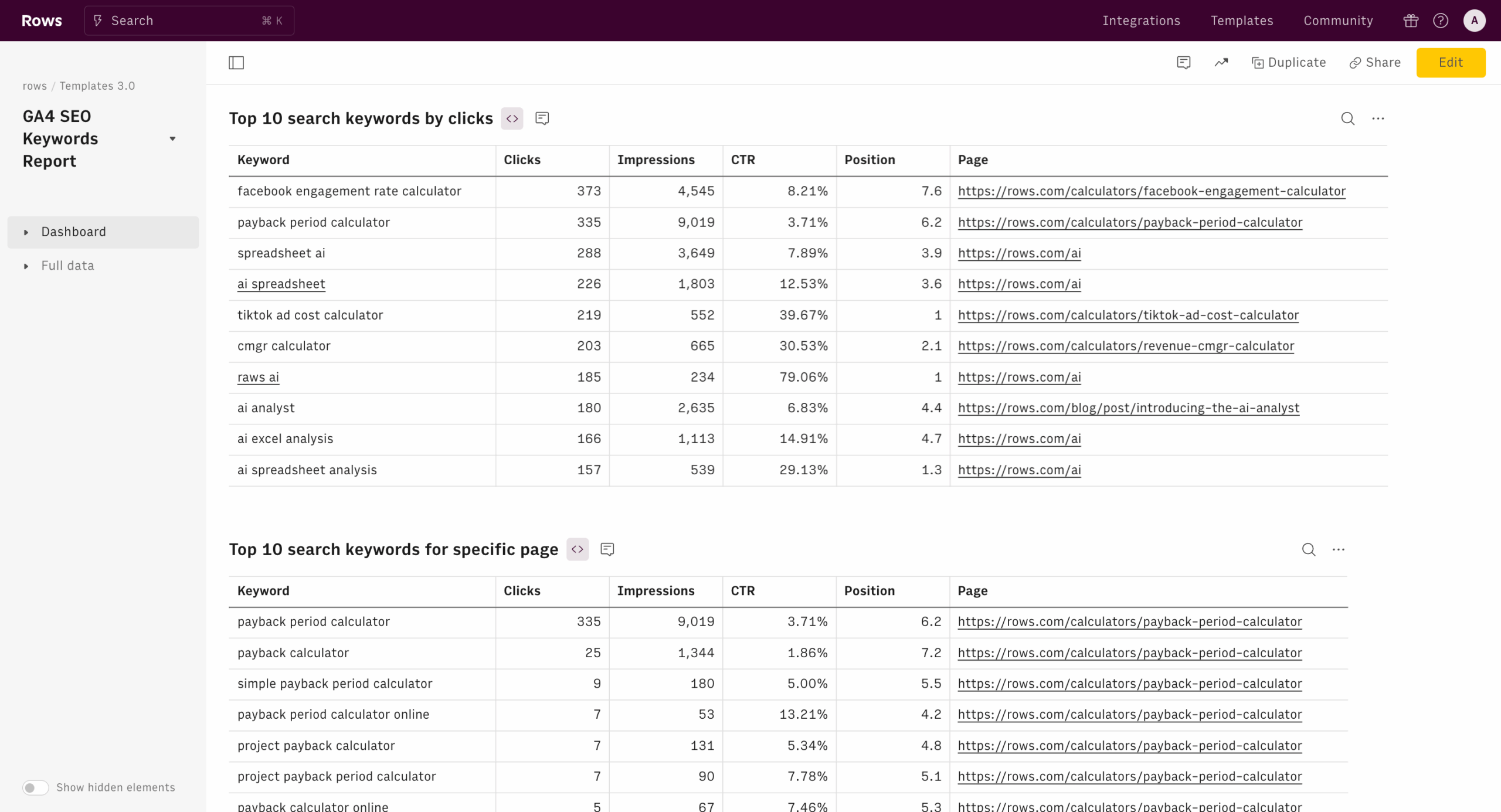
Free SEO Keyword Ranking Report: What It Shows and How to Use It
A free SEO keyword ranking report can help you understand where your website appears in search results for the terms that matter to your business. It offers a useful starting point for measuring organic search visibility, spotting opportunities and deciding what to improve next.
Whether you manage a small business website, publish a blog or work in digital marketing, regular ranking checks can turn SEO from guesswork into a more informed process. The key is to look beyond a single position and understand what the data says about your wider search performance.
What is an SEO keyword ranking report?
An SEO keyword ranking report shows how a website performs in search engine results for a selected set of keywords. Depending on the tool, a report may include:
- Keyword: the search term being tracked.
- Ranking position: where a page appears in the results.
- Landing page: the page associated with the keyword.
- Search volume: an estimate of how often people search for the term.
- Ranking changes: whether the position has improved or declined over time.
- Search location and device: the country, region or device used for the check, where available.
Some reports also show estimated traffic, keyword difficulty or search result features. These figures are useful for comparison, but they are estimates rather than guarantees of traffic or future rankings.
Why check your keyword rankings?
Rank tracking helps you assess whether your SEO work is moving in the right direction. It can help you:
- See which search terms already bring your pages into the results.
- Find keywords for which your pages rank just outside the top results.
- Notice ranking changes that may need investigation.
- Check whether a page is targeting the search intent behind its keyword.
- Compare performance across topics, locations or sections of your website.
Rankings are only one part of SEO performance. A high position does not automatically mean a visitor will click, and a click does not guarantee a sale or enquiry. Pair ranking data with metrics such as organic clicks, impressions, click-through rate and conversions for a more complete picture.
How to create a useful free keyword ranking report
Choose relevant keywords
Start with terms that reflect what your audience is looking for and what your website can genuinely provide. Include a mix of broad topics and more specific phrases. For example, a local bakery might track a broad term such as “artisan bakery” alongside more specific searches such as “sourdough bakery in Bristol”.
A long list is not always better. A focused selection of relevant keywords is easier to review and more useful for planning.
Select the right page and location
Identify the page you expect to rank for each keyword. If several pages target the same search, the report may reveal that the intended page is not appearing, or that your pages are competing with one another.
Where possible, set the report to reflect your audience’s location and device. Search results can vary by country, region, language and other factors, so a ranking check from one location may not match what every user sees.
Record a baseline
Save the first report as a baseline, then compare later checks over a consistent period. Search positions can fluctuate, so avoid making a major decision based on a single day’s result. Look for sustained patterns instead.
Review changes in context
If a keyword moves up or down, check the page, the search results and any recent website changes. Consider whether the search intent has shifted, competitors have improved their content, or technical issues are affecting your page. A ranking change alone does not identify its cause.
How to interpret the results
A keyword ranking report is most valuable when you use it to ask practical questions:
- Are relevant pages visible? If a useful page is not ranking, review its content, internal links and technical accessibility.
- Are there near-term opportunities? Pages appearing lower down the results may benefit from clearer answers, stronger topical coverage or improved page titles.
- Do rankings lead to visits? Compare rankings with search impressions and clicks. A page may rank but attract few clicks if its result is not compelling or does not match the query.
- Are the right pages ranking? If an unexpected page appears, clarify the site structure and ensure each page has a distinct purpose.
- Is performance improving over time? Look at trends across a suitable period rather than focusing on small daily movements.
Free reports: benefits and limitations
A free SEO keyword ranking report can be a practical way to start monitoring search visibility without committing to a paid platform. It can help with basic checks, prioritisation and routine reporting.
Free tools may have limits, such as a cap on the number of keywords, less frequent updates, restricted location settings or fewer historical records. Rankings can also differ between tools because they use different data sources and checking methods. Treat the results as directional, and use the same tool and settings when comparing performance over time.
For additional context, Google Search Console provides data about how a site performs in Google Search, including impressions, clicks and average position for queries. Its average-position metric is not the same as a fixed, personalised ranking check, so it is best used alongside other evidence rather than as a direct substitute.
Common mistakes to avoid
- Tracking irrelevant keywords: search volume is of little value if the term does not match your audience or offering.
- Obsessing over one position: rankings fluctuate, and small movements may not have a meaningful business impact.
- Ignoring search intent: a page needs to satisfy what searchers are trying to find, not just include a phrase.
- Assuming ranking equals traffic: clicks also depend on the query, the result presentation and the searcher’s needs.
- Changing content too quickly: make considered updates and allow time to assess their effect.
- Forgetting conversions: the aim is not simply to rank, but to attract relevant visitors and help them take a useful next step.
Make your report part of a regular SEO routine
A simple monthly review is often enough for a small website. Check your priority keywords, note meaningful changes, compare rankings with traffic and conversions, then choose a few improvements to test. Larger or frequently updated websites may need more regular monitoring.
Use a free SEO keyword ranking report as a guide, not a verdict. Combined with useful content, a technically sound website and broader performance data, it can help you make better decisions and steadily improve your organic search visibility.
Essential Tips for Generating Free SEO Keyword Ranking Reports
- Track your target keywords weekly.
- Check rankings by location and device.
- Compare results with previous reports.
- Prioritise keywords with strong search intent.
- Use free tools to spot ranking changes.
- Verify important results with a second tool.
Track your target keywords weekly.
Track your target keywords weekly to spot meaningful changes in search visibility and respond before small issues become bigger problems. Use the same tool, location and settings each time for a fair comparison, and focus on ongoing trends rather than reacting to a one-week fluctuation. Record your results alongside clicks and conversions to see whether ranking changes are bringing more of the right visitors to your website.
Check rankings by location and device.
Check your keyword rankings by location and device to get a clearer picture of how different audiences see your website in search results. Rankings can vary between regions, countries and mobile and desktop searches, so a single check may not reflect the experience of all your potential customers. Set your report to match the areas you serve and the devices your audience uses, then compare results over time to spot meaningful differences and opportunities.
Compare results with previous reports.
Compare your latest free SEO keyword ranking report with previous reports to identify meaningful trends, rather than reacting to a single change. Check which keywords have improved, declined or stayed steady, and consider whether recent content updates or website changes may have influenced the results. For a fair comparison, use the same keywords, locations and settings each time, and remember that rankings can fluctuate naturally.
Prioritise keywords with strong search intent.
Prioritise keywords with strong search intent by focusing on the terms that show what people genuinely want to do, such as compare options, find a local service or make a purchase. In your free SEO keyword ranking report, group keywords by intent and give greater attention to those that closely match your pages and business goals. This helps you focus SEO efforts on attracting relevant visitors, rather than chasing high-volume searches that are unlikely to lead to meaningful engagement or conversions.
Use free tools to spot ranking changes.
Use free SEO tools to check your keyword rankings regularly and spot meaningful changes over time. Compare reports using the same keywords, location and settings, so the results are easier to interpret. If a ranking rises or falls, review the page and its search performance before making changes—one fluctuation may not signal a lasting trend.
Verify important results with a second tool.
Verify important results with a second tool before making major SEO decisions. Keyword rankings can vary between platforms because they may use different data sources, locations, devices and checking methods. Comparing results helps you spot inconsistencies and judge whether a change is a genuine trend or simply a difference in reporting. For a clearer picture, keep the settings consistent and check rankings alongside data such as impressions, clicks and conversions.