
Site SEO Optimization: A Practical Guide to Improving Your Website
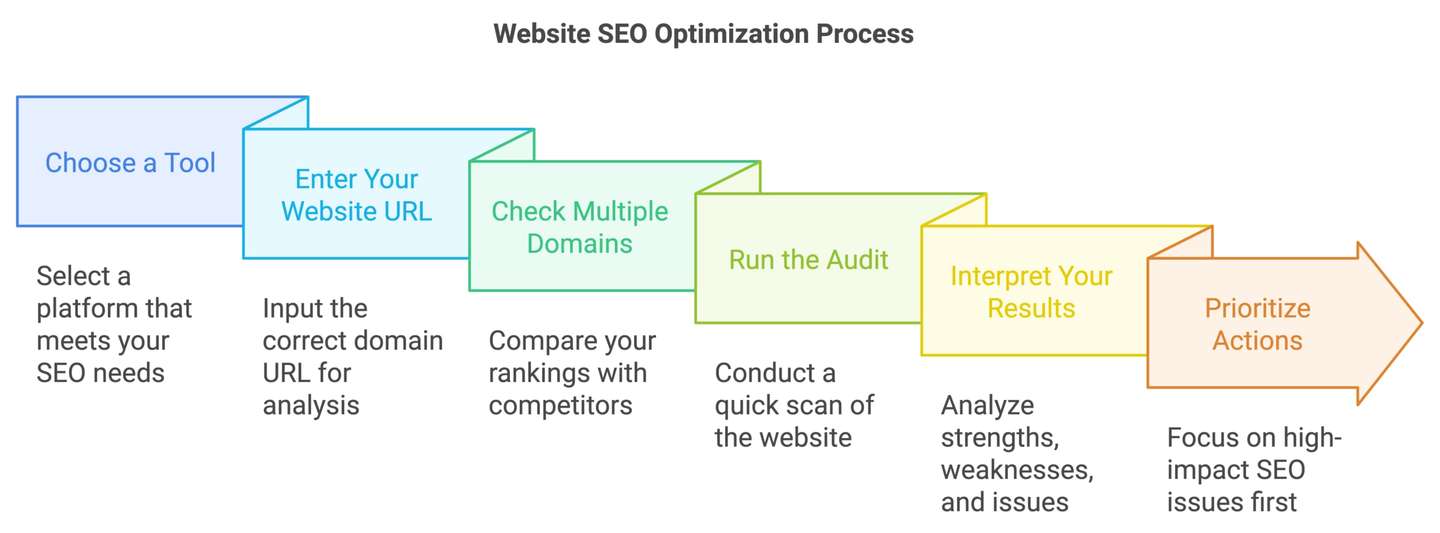
Website SEO Optimisation: A Practical Guide
Website SEO optimisation is the process of improving a site so that search engines can find, understand and present its pages to people searching for relevant information. It also involves making the site useful and easy to navigate for visitors. A strong SEO approach brings together technical improvements, helpful content and a good user experience.
SEO is not a one-off task or a guarantee of specific rankings. Search results can change over time, so it is best to build a clear strategy, make improvements steadily and measure what happens.
Make sure search engines can access your site
Before focusing on keywords or content, check that search engines can reach and understand your important pages. Review your site’s robots.txt file and make sure it is not blocking pages you want indexed. An XML sitemap can help search engines discover key URLs, although submitting one does not guarantee that every page will be indexed.
Check for accidental “noindex” instructions, broken links, redirect loops and pages that return errors. Use Google Search Console or another reputable webmaster tool to monitor indexing issues and identify technical problems.
Improve site structure and navigation
A clear site structure helps visitors find information and helps search engines understand how pages relate to one another. Organise content into sensible categories, use descriptive navigation labels and link related pages together.
- Keep important pages easy to reach from the main navigation.
- Use clear, readable URLs that describe the page.
- Add internal links where they genuinely help readers.
- Use breadcrumbs on larger sites to show where a page sits in the structure.
Avoid creating unnecessary pages or complicated navigation simply to include more keywords. Every page should have a clear purpose for its audience.
Research the language your audience uses
Keyword research helps you understand what people are looking for and how they describe it. Consider the questions, problems and needs behind a search, rather than focusing only on search volume. A phrase with a modest number of searches may still be valuable if it closely matches what your business offers.
Group related search terms by topic and decide which page should address each group. This can reduce overlap between pages and help you create content that answers a specific need. Use keywords naturally in headings, page titles and body copy; avoid awkward repetition or keyword stuffing.
Create useful, original content
High-quality content gives visitors a clear reason to visit your site. It should answer the question or meet the need that brought them to the page. Make information accurate, easy to follow and appropriate for your intended audience.
Before publishing, consider whether the page:
- Provides useful information that is not simply copied from elsewhere.
- Has a clear focus and an informative heading.
- Uses examples, evidence or practical steps where appropriate.
- Is easy to scan, with concise paragraphs and descriptive subheadings.
- Is kept up to date when the subject changes.
There is no ideal word count for every page. Write enough to cover the subject properly, but do not add filler to make a page longer.
Optimise titles, headings and descriptions
Each important page should have a distinctive title that accurately describes its content. Page titles can help search engines and users understand what a page is about, while also giving searchers a reason to choose it in results.
Use a clear main heading, followed by subheadings that organise the content. Meta descriptions should summarise the page and encourage relevant visitors to click. Search engines may choose to display a different description, so treat it as a useful summary rather than a guaranteed search-result snippet.
Improve mobile usability and page speed
Many people browse on mobile devices, so pages should work well on smaller screens. Text should be readable without zooming, buttons should be easy to use and important content should not be hidden behind intrusive elements.
Page speed also matters to the experience visitors have on your site. Compress images, remove unnecessary scripts and choose reliable hosting. Tools such as PageSpeed Insights can highlight potential performance issues, but prioritise changes that improve the experience for real users.
Use images and structured data thoughtfully
Use descriptive file names and write helpful alternative text for images that convey information. Alternative text should explain the image’s purpose, not serve as a place to repeat keywords. Decorative images can usually be marked so assistive technologies ignore them.
Structured data can provide search engines with additional context about a page, such as whether it describes a product, an event or an organisation. Use the appropriate format and follow current search engine guidelines. Structured data does not guarantee enhanced search results.
Build trust and earn relevant links
Make it clear who is responsible for your site and how visitors can contact you. Depending on the subject, useful trust signals may include author details, transparent business information, references and clear policies.
Links from other websites can help people discover your content and may contribute to how search engines assess it. Focus on creating resources worth referencing and building genuine relationships within your industry. Avoid buying links or taking part in schemes designed to manipulate rankings.
Measure results and keep improving
Track a small set of meaningful measures, such as organic visits, search impressions, clicks, enquiries, sales or other important actions. Search Console can show how pages perform in Google Search, while an analytics platform can help you understand what visitors do after arriving.
Review results over time rather than reacting to short-term fluctuations. If a page attracts visitors but does not meet their needs, improve the content or next steps. If an important page is not receiving impressions, check its relevance, indexing status, internal links and competition.
Conclusion
Effective website SEO optimisation starts with a site that works well, offers valuable content and makes information easy to find. By improving accessibility, structure, content, mobile usability and measurement, you can build a stronger foundation for search visibility and a better experience for visitors. Make changes thoughtfully, follow reliable guidance and review your progress regularly.
Top 6 Tips for Effective Site SEO Optimisation
- Use clear, descriptive page titles.
- Write unique meta descriptions for key pages.
- Make URLs short and easy to read.
- Use headings to organise page content.
- Optimise images with descriptive alt text.
- Improve page speed and mobile usability.
Use clear, descriptive page titles.
Use clear, descriptive page titles to help visitors and search engines understand what each page is about. Keep each title unique, relevant to the page content and concise enough to display clearly in search results. Include the main topic naturally, but avoid keyword stuffing or vague titles that could apply to any page.
Write unique meta descriptions for key pages.
Write a unique meta description for each important page on your website. A clear, accurate summary helps people understand what the page offers and can encourage relevant searchers to click through from results. Keep it concise, use natural language and reflect the page’s content rather than repeating the same description across your site. Search engines may display a different snippet, so treat your meta description as a helpful suggestion, not a guarantee.
Make URLs short and easy to read.
Keep URLs short, clear and easy to read so visitors and search engines can quickly understand what a page is about. Use a few descriptive words that reflect the page’s topic, separate them with hyphens and avoid unnecessary numbers, symbols or strings of keywords. For example, “example.com/seo-audit” is easier to understand than a long URL filled with unrelated terms. If you change an existing URL, set up a redirect from the old address to the new one to help visitors and search engines find the page.
Use headings to organise page content.
Use headings to organise page content and make it easier for visitors to scan and understand. Start with one clear main heading, then use descriptive subheadings in a logical order to divide the page into useful sections. This structure can also help search engines interpret the content, but headings should accurately describe each section rather than being used simply to add keywords.
Optimise images with descriptive alt text.
Optimise images by adding concise, descriptive alt text that explains what each meaningful image shows and, where relevant, its purpose on the page. This helps people using screen readers understand visual content and gives search engines useful context. Keep the wording natural and specific, and avoid stuffing it with keywords. For purely decorative images, use empty alt text so assistive technology can skip them.
Improve page speed and mobile usability.
Improve page speed and mobile usability to give visitors a smoother experience and make your site easier to use on any device. Compress images, reduce unnecessary scripts and use reliable hosting to help pages load quickly. Check that text is easy to read on smaller screens, buttons are simple to tap and visitors do not need to zoom or scroll sideways to find key information. Regularly test your pages on mobile devices and use performance tools to identify issues worth fixing.