
The Best SEO Tools: A Practical Guide to Improving Your Website’s Search Performance
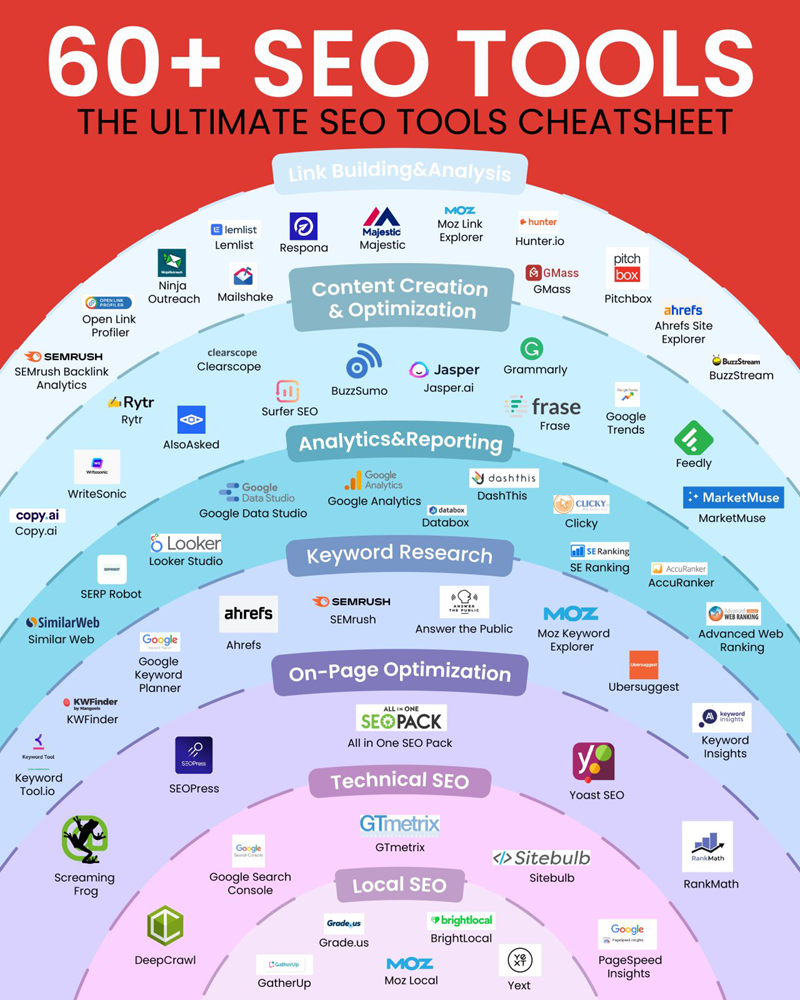
The Best SEO Tools: A Practical Guide
Search engine optimisation (SEO) involves much more than adding keywords to a webpage. It includes researching what people search for, improving website content, fixing technical issues and measuring results over time. The right SEO tools can make these tasks quicker and help you make decisions based on useful data.
There is no single tool that is best for every website. Some are free and ideal for beginners, while others offer broader research and reporting features for agencies and larger businesses. Here are some of the most useful SEO tools and what they can help you do.
Google Search Console
Google Search Console is a free tool for understanding how a website performs in Google Search. It can show which queries bring people to your pages, how often pages appear in search results and how many clicks they receive. It also reports indexing and some technical issues.
It is a strong starting point for almost any site owner. Use it to find pages that receive impressions but few clicks, check whether important pages are indexed and monitor changes in search performance. Search Console focuses on Google, so it is best used alongside analytics and other SEO tools.
Google Analytics 4
Google Analytics 4 (GA4) helps you understand what visitors do after they arrive on your website. It can provide insight into traffic sources, engagement and conversions, depending on how your measurement is configured.
GA4 is not a keyword research tool, but it can help you assess whether organic search is contributing to meaningful outcomes, such as enquiries, purchases or newsletter sign-ups. Make sure tracking is set up correctly and that your use of analytics complies with applicable privacy requirements.
Ahrefs
Ahrefs is a popular paid SEO platform known for backlink research, keyword discovery and competitor analysis. It can help you explore the websites linking to a domain, find content ideas and identify search terms worth investigating.
It is especially useful for marketers who need to research links and compare their website with competitors. As with any third-party platform, its figures are estimates rather than a complete record of Google’s data.
Semrush
Semrush brings together a wide range of marketing and SEO features, including keyword research, site audits, rank tracking and competitor analysis. Its breadth can make it useful for teams that want several workflows in one platform.
Because it offers many features, new users may need time to learn their way around. Start with a clear goal—such as finding content opportunities or checking technical issues—rather than trying to use every report at once.
Screaming Frog SEO Spider
Screaming Frog SEO Spider crawls websites to uncover technical and on-page issues. It can help identify broken links, redirect chains, missing or duplicated page titles and other problems that may be difficult to spot manually.
It is particularly valuable for larger websites and technical SEO work. The software runs on a computer, and its reports can be detailed, so some familiarity with SEO concepts is helpful. A crawl can also put a load on a website, so configure it thoughtfully.
Google Keyword Planner
Google Keyword Planner is designed for planning Google Ads campaigns, but it can also be used to discover keyword ideas and explore estimated search volumes. It is a useful free option for building an initial list of topics and search terms.
Its estimates are intended for advertising planning and may not match the exact number of organic searches. Treat them as directional data, then consider search intent, competition and whether your website can provide a genuinely useful answer.
Moz Pro
Moz Pro offers tools for keyword research, rank tracking, site audits and link analysis. Its accessible interface and learning resources can make it a helpful option for people developing their SEO skills.
Compare its features with other platforms before choosing a subscription. The best fit depends on the size of your site, the reports you need and how often you will use them.
Google PageSpeed Insights
Google PageSpeed Insights analyses a page’s loading performance and provides suggestions for improvement. It includes lab data and, where available, real-world data from visitors using Chrome.
Use it to investigate specific pages, but do not treat a single score as the whole story. Performance can vary by device, network and page content. Prioritise changes that improve the experience for real visitors as well as test results.
SEO content optimisation tools
Tools such as Surfer and similar content platforms can help writers review topics, headings and related terms found across search results. They can support content planning, but they should not dictate every phrase or heading.
Useful content is written for people first. Check facts, answer the reader’s question clearly and avoid adding keywords where they do not fit naturally. A tool can offer suggestions, but editorial judgement remains essential.
How to choose the right SEO tools
Before paying for a platform, consider what you need it to do:
- For basic website monitoring: start with Google Search Console and GA4.
- For keyword and competitor research: compare platforms such as Ahrefs, Semrush and Moz Pro.
- For technical audits: consider Screaming Frog alongside Search Console and PageSpeed Insights.
- For content planning: use keyword research tools to understand topics and search intent, then apply your own editorial judgement.
- For a small budget: make the most of free tools before subscribing to paid services.
It is also worth checking how often a tool updates its data, what limits apply to your plan and whether its reports are easy to share with colleagues or clients. Avoid paying for overlapping features that you are unlikely to use.
Using SEO tools effectively
SEO tools are most useful when they support a clear process. Start by checking how your site appears in search, identify the biggest opportunities or problems, make improvements and measure the results. Keep notes about changes so that you can understand what may have affected performance.
No tool can guarantee higher rankings. Search results depend on many factors, and estimates from third-party platforms are not the same as data from a search engine. Use tools as guides, validate important findings and focus on making your website helpful, accessible and technically sound.
Conclusion
The best SEO tools are the ones that help you make better decisions without adding unnecessary complexity. Google Search Console and GA4 provide a useful foundation, while specialist platforms such as Ahrefs, Semrush, Moz Pro and Screaming Frog can support more advanced research and audits. Choose tools to match your goals, check their data carefully and put the needs of your audience first.
Top 6 Essential SEO Tools for Effective Website Optimisation
- Use Google Search Console to track rankings, clicks and indexing issues.
- Try Ahrefs or Semrush for keyword and competitor research.
- Use Screaming Frog to find technical SEO problems on your site.
- Check page speed with Google PageSpeed Insights.
- Use Google Analytics to understand organic traffic and conversions.
- Compare tool features and pricing before choosing your SEO toolkit.
Use Google Search Console to track rankings, clicks and indexing issues.
Use Google Search Console to monitor how your website performs in Google Search. Its Performance report shows impressions, clicks, click-through rates and average position for your pages and search queries, while the Indexing reports help you spot pages Google could not index and investigate potential issues. Check the data regularly to identify opportunities and resolve problems affecting your visibility.
Try Ahrefs or Semrush for keyword and competitor research.
For keyword and competitor research, consider using Ahrefs or Semrush. Both platforms can help you discover search terms, explore competing websites and spot potential content opportunities. Their features and data estimates differ, so try each one to see which best suits your needs and budget. Treat the results as a guide, then use your judgement to prioritise relevant keywords and create genuinely useful content.
Use Screaming Frog to find technical SEO problems on your site.
Use Screaming Frog SEO Spider to crawl your website and uncover technical SEO issues that may be difficult to spot manually. It can identify problems such as broken links, redirect chains, missing page titles and duplicate content, helping you prioritise fixes that improve how search engines access and understand your pages. Review its findings carefully, as not every flagged issue will need immediate action.
Check page speed with Google PageSpeed Insights.
Check your website’s loading speed with Google PageSpeed Insights. Enter a page URL to see how it performs on mobile and desktop, review available real-world performance data and get suggestions for improvements. Use the results to spot issues such as large images or slow-loading resources, but treat the score as a guide rather than the only measure of success. Focus on changes that make pages faster and easier to use for your visitors.
Use Google Analytics to understand organic traffic and conversions.
Use Google Analytics 4 (GA4) to understand how visitors from organic search use your website and whether they take valuable actions, such as making a purchase, submitting an enquiry or signing up to a newsletter. Review organic traffic alongside engagement and conversion data to see which pages and landing journeys are working well, and where visitors may be dropping off. Make sure key events are configured correctly, and remember that analytics data depends on your tracking setup and users’ consent choices.
Compare tool features and pricing before choosing your SEO toolkit.
Before choosing an SEO toolkit, compare each tool’s features and pricing against your needs. Check which tasks it supports—such as keyword research, site audits, backlink analysis or rank tracking—and whether its data limits, reporting options and user allowances suit your website or team. Compare subscription tiers and look for free trials or plans, but avoid paying for features you are unlikely to use. The best-value toolkit is one that provides the insights you need at a price that fits your budget.