
Monthly Keyword Rank Tracker Reports: What to Include and How to Use Them
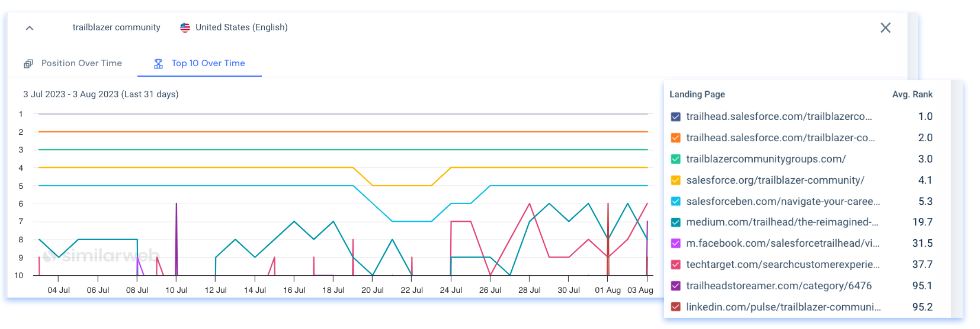
Monthly Keyword Rank Tracker Reports: What to Include and How to Use Them
A monthly keyword rank tracker report shows how a website’s positions in search results have changed over time. It can help businesses understand whether their SEO work is improving visibility, identify pages or keywords that need attention, and spot changes in the search landscape.
Rankings are only one part of SEO performance. A useful report puts them in context with organic traffic, clicks, impressions and conversions, so teams can make decisions based on more than a list of positions.
Why create a monthly ranking report?
Search rankings can fluctuate from day to day. A monthly view helps smooth out short-term movement and makes longer-term patterns easier to see. Regular reporting can help you:
- Measure progress for priority keywords.
- Find keywords that are gaining or losing visibility.
- Check whether recently optimised pages are performing as expected.
- Identify relevant keywords where your site ranks just outside the leading results.
- Share SEO progress and priorities with colleagues, clients or stakeholders.
What to include in a monthly keyword rank tracker report
Reporting period and tracking settings
State the dates covered by the report and explain how rankings were checked. Results can vary by search engine, country, language, device and location. Keep these settings consistent from month to month wherever possible, so comparisons are meaningful.
Priority keywords and landing pages
Show each target keyword alongside the page intended to rank for it. This makes it easier to see whether the right page is appearing in search results and can reveal keyword cannibalisation, where multiple pages compete for similar terms.
Current position and change
Include the latest recorded position and the change compared with the previous reporting period. For example, a keyword may have moved from position 14 to position
Make clear whether a positive number means an improvement, as ranking reports can present changes in different ways.
It is usually more helpful to highlight meaningful groups, such as keywords entering the top 10 or moving out of the top 20, than to focus on every small position change.
Visibility and search performance
Where available, include visibility estimates or impressions alongside rankings. Google Search Console can provide impressions, clicks, click-through rate and average position for a site’s search results. These figures complement rank-tracking data, although the measurements are not always directly comparable because tools may use different methods.
Search intent and keyword groups
Group keywords by topic, page type, product or search intent. For example, informational searches such as “how to clean a coffee machine” may need a different content approach from transactional searches such as “buy coffee machine”. Grouping terms makes it easier to assess the performance of a whole topic rather than treating every keyword as an isolated result.
Notable changes and recommended actions
A report should explain what has changed and what to do next. Note significant gains and declines, possible causes, and actions for the coming month. Recommendations might include updating a page, improving internal links, checking technical issues or reviewing whether the page matches the search intent.
How to interpret ranking changes
A rise or fall in position does not automatically indicate a lasting change in performance. Rankings can shift because of competitor activity, search engine updates, changes to the search results page, location, device or the way a tracking tool collects data.
Before taking action, look for patterns. Has the movement continued over several weeks? Are several related keywords affected, or just one? Have clicks and impressions changed as well? Check the relevant landing page and compare the period with previous months or the same period last year, where seasonal demand may be a factor.
Also remember that a ranking position is not the same as a guaranteed amount of traffic. Search results can include features such as maps, product listings, featured snippets and AI-generated summaries. These can affect how much attention traditional organic listings receive.
Choosing keywords to track
Track a focused set of keywords that reflects your business goals, rather than trying to monitor every possible variation. A useful keyword list can include:
- Important product, service or category terms.
- Keywords linked to high-value landing pages.
- Informational searches that support the customer journey.
- Relevant local terms, if the business serves specific areas.
- New keywords you are testing as part of a content plan.
Review the list regularly. Remove terms that are no longer relevant, add new opportunities and check that each keyword has a clear purpose and a suitable page.
A simple monthly reporting process
- Set a consistent baseline: Use the same search engine, location, language and device settings each month.
- Collect the data: Record rankings and, where possible, impressions, clicks and organic conversions.
- Compare periods: Review month-on-month movement, while also considering longer-term and seasonal patterns.
- Investigate significant changes: Check affected pages, search results, competitors and recent website updates.
- Summarise the findings: Explain the most important gains, declines and uncertainties in plain language.
- Agree next steps: Assign practical actions, owners and review dates.
Common reporting mistakes to avoid
- Focusing only on average position: A single average can conceal differences between keywords, pages and locations.
- Comparing inconsistent data: Changing tracking settings makes month-to-month comparisons less reliable.
- Overreacting to small fluctuations: Confirm whether a change is sustained before making major changes to a page.
- Tracking too many keywords: An oversized list can make important movements difficult to identify.
- Ignoring business outcomes: Connect ranking trends with relevant traffic, enquiries, sales or other conversion goals.
- Reporting without recommendations: Data is more useful when it leads to clear, prioritised actions.
Make reports clear and actionable
The best monthly keyword rank tracker reports are easy to scan and tailored to their audience. A business owner may need a short summary of visibility and outcomes, while an SEO team may need keyword-level details and landing-page data. Use concise charts or tables where helpful, define important metrics and distinguish measured data from estimates.
Most importantly, treat rankings as a diagnostic signal rather than the sole measure of SEO success. When combined with search performance data, page quality and business results, a monthly report can help guide more informed decisions and keep SEO work focused on long-term improvement.
Understanding Monthly Keyword Rank Tracker Reports: Top 8 FAQs Answered
- How can I check my keyword ranking?
- What is a ranking report?
- What is keyword ranking report?
- How do I get keyword ranking report?
- How do I track keyword ranking in Google Analytics?
- How do I monitor keyword rankings?
- How do I keep track of keywords in SEO?
- What is rank report SEO?
How can I check my keyword ranking?
To check your keyword ranking, use a keyword rank tracker by entering your website, target keywords and the relevant country or location, then review the positions for your chosen search engine and device. For a broader view, check Google Search Console’s Performance report for impressions, clicks and average position. Rankings can vary by location, device and personalisation, so use consistent tracking settings and compare results over time rather than relying on a single manual search.
What is a ranking report?
A ranking report is a summary of how a website’s pages perform in search engine results for selected keywords. It typically shows each keyword’s current position, changes over a chosen period, and sometimes related data such as search visibility, impressions or clicks. A monthly ranking report helps track trends, assess SEO progress and identify pages or keywords that may need further attention.
What is keyword ranking report?
A keyword ranking report shows where a website appears in search engine results for a selected set of keywords over a given period. It may include current positions, changes since the previous report, and details such as the search engine, location and device tracked. Reviewing the report monthly can help you spot trends, assess SEO progress and identify pages or keywords that may need further attention.
How do I get keyword ranking report?
To get a keyword ranking report, add your target keywords to a rank-tracking tool, choose the relevant search engine, location, language and device, then run a report for your chosen date range. Most tools let you view changes over time and export the results as a PDF or spreadsheet. For a fuller picture, compare ranking data with Google Search Console clicks and impressions, and include the landing pages associated with each keyword.
How do I track keyword ranking in Google Analytics?
Google Analytics does not track Google keyword rankings directly; it shows how people behave on your website, rather than the position of your pages in search results. To see search queries, clicks, impressions and average position, link your Google Search Console property to GA4 and review the Search Console reports, or use Search Console itself. For consistent monthly position tracking by keyword, location and device, use a dedicated rank-tracking tool, then compare its data with GA4’s organic traffic and conversion figures.
How do I monitor keyword rankings?
Monitor keyword rankings using a rank-tracking tool: add the search terms that matter to your business, then set the search engine, location, language and device to match your audience. Review positions regularly and compare them over time, rather than reacting to daily fluctuations. Pair ranking data with impressions, clicks and conversions from tools such as Google Search Console to understand whether changes are bringing meaningful results.
How do I keep track of keywords in SEO?
To keep track of keywords in SEO, choose relevant search terms that match your audience’s needs and the pages you want them to find. Add them to a keyword rank tracker, set the target search engine, location, language and device, then check positions regularly—often weekly or monthly. Review ranking changes alongside impressions, clicks, organic traffic and conversions to understand whether your SEO is delivering results. Keep your tracking settings consistent, group keywords by topic or search intent, and use significant changes to guide updates to your content and website.
What is rank report SEO?
An SEO rank report is a summary of how a website’s pages appear in search engine results for selected keywords over a set period. It usually shows current positions and changes over time, and may include related metrics such as search visibility, impressions and clicks. Reviewing rank reports regularly helps identify progress, spot potential issues and decide which pages or keywords may need further optimisation.