
Free SEO Evaluation Tool: A Simple Guide to Improving Your Website’s Performance
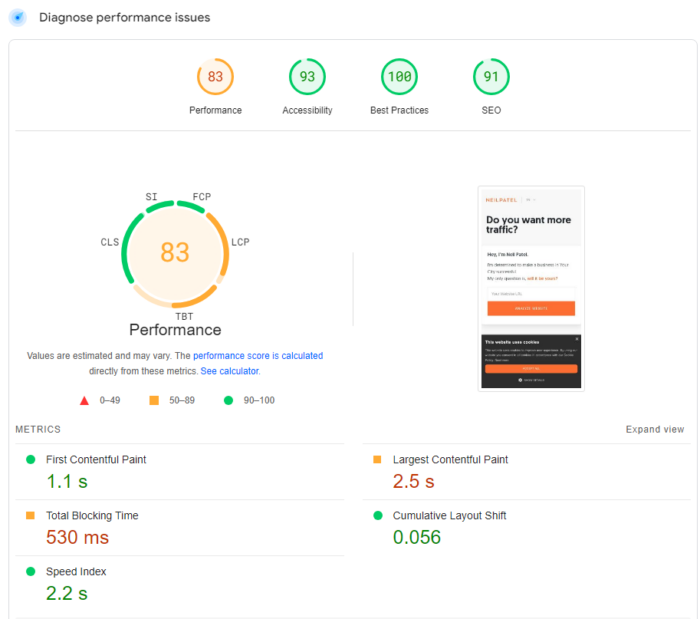
Free SEO Evaluation Tool: A Practical Way to Review Your Website
Search engine optimisation (SEO) can feel complicated, particularly when a website has many pages and technical details to check. A free SEO evaluation tool can help you get a clearer picture of how your site is performing and highlight areas that may need attention.
Whether you manage a small business website, publish a blog or work in digital marketing, an evaluation is a useful starting point. It can help turn a broad question — “How well is my website optimised?” — into a more manageable list of things to review.
What is a free SEO evaluation tool?
A free SEO evaluation tool analyses a web page or website against a range of search optimisation factors. Depending on the tool, it may review elements such as page titles, meta descriptions, headings, links, content and technical signals. The results can indicate what is working well and where improvements could be considered.
Tools vary in what they check, so an evaluation should be treated as guidance rather than a complete verdict. Search rankings depend on many factors, including the quality and usefulness of content, the needs of your audience, competition and changes to search engine systems.
What can an SEO evaluation check?
A free evaluation may cover some or all of the following areas:
- Page titles and meta descriptions: Are they relevant to the page and clearly describe its content?
- Headings: Is the page organised with a logical heading structure?
- Content: Does the page address its subject clearly and provide value to readers?
- Links: Are internal links useful, and do external links lead to appropriate destinations?
- Images: Do images have descriptive alternative text where appropriate, and are file sizes reasonable?
- Mobile usability: Is the page easy to use on smaller screens?
- Page performance: Are there loading or technical issues that could affect the visitor experience?
- Basic technical signals: Can the page be accessed and understood by search engines?
Why use a free SEO evaluation tool?
The main benefit is that it can make an initial review quicker and easier. Rather than checking every detail manually, you can use the results to identify possible priorities and decide what to investigate next.
A free tool can also be helpful if you are new to SEO. It may introduce common optimisation terms and show how on-page elements fit together. For experienced users, it can serve as a quick check before publishing or as part of a regular website review.
How to use the results effectively
- Choose a representative page. Start with an important page, such as a key service page, product page or popular article.
- Run the evaluation. Enter the page address and review the findings provided by the tool.
- Check the recommendations. Consider whether each suggestion is relevant to the page and its audience.
- Prioritise meaningful improvements. Address issues that affect clarity, usability or accessibility before making minor changes solely to improve a score.
- Review the page again. After making changes, check the page and monitor its performance over time.
Do not rely on a score alone
An SEO score can be a convenient summary, but it does not guarantee higher rankings or more visitors. Different tools use different checks, and a high score cannot replace useful content, a good visitor experience or a sound understanding of your audience.
Use evaluation results as prompts for further investigation. For example, a tool may flag a missing description, but the best description still needs to explain the page accurately and encourage the right people to visit. Similarly, recommendations about keywords should never lead to awkward, repetitive writing.
Make SEO evaluation part of a regular routine
Websites change as new pages are published, products are updated and technology evolves. A periodic SEO evaluation can help you spot issues and keep important pages in good order. It is most useful when combined with other sources of insight, such as website analytics, search performance data and feedback from visitors.
A free SEO evaluation tool is a practical first step towards understanding your website’s optimisation. Use it to find opportunities, apply your judgement and focus on improvements that make the site more helpful for both visitors and search engines.
Top 22 FAQs About Free SEO Evaluation Tools: Your Guide to the Best Options and Practices
- Which is the best free SEO tool?
- Which tool is better for checking SEO score?
- How can I check my SEO performance for free?
- Does Google have a free SEO tool?
- Can I do SEO for free?
- Is SEO PowerSuite free?
- Can I use Moz for free?
- How can I check my SEO for free?
- Does Google have an SEO checker?
- How can I check my SEO ranking?
- How do I test my SEO?
- How can I get free SEO reports?
- What is the best free SEO tool?
- How do I Analyse SEO for my website?
- How can I get free SEO Premium tools?
- How can I do SEO audit for free?
- Is there a free SEO checker?
- Is SEO free on Google?
- How can I check my SEO?
- Is SEO Analyzer free?
- Which is a free SEO audit tool?
- How do I check my SEO audit?
Which is the best free SEO tool?
The best free SEO tool depends on what you need to check. Google Search Console is a strong choice for monitoring how your website appears in Google Search and identifying indexing issues, while tools such as Google Analytics can help you understand how visitors use your site. For a quick review of page titles, headings, links and other on-page elements, a free SEO evaluation tool can offer a useful starting point. No single tool covers everything, so choose one that suits your goals and treat its recommendations as guidance rather than a guarantee of better rankings.
Which tool is better for checking SEO score?
There is no single “best” tool for checking an SEO score, as different tools assess different factors and use their own scoring systems. A free SEO evaluation tool can provide a helpful overview of issues such as page titles, headings, links and technical performance, but its score should be treated as a guide rather than a guarantee of search rankings. Choose a tool that explains its findings clearly, then use the recommendations alongside search performance data and your own review of the website.
How can I check my SEO performance for free?
You can check your SEO performance for free by using a free SEO evaluation tool to review key areas such as page titles, meta descriptions, headings, links, mobile usability and page speed. You can also use free services such as Google Search Console to see how your pages appear in Google Search, including impressions, clicks and average positions. Treat results as a starting point rather than a definitive score: prioritise changes that improve your content and visitor experience, then monitor performance over time.
Does Google have a free SEO tool?
Yes. Google provides several free tools that can help with SEO, including Google Search Console, which shows how your website performs in Google Search and flags some indexing and usability issues. Google Analytics can help you understand how visitors use your site, while PageSpeed Insights reports on page performance and Core Web Vitals. These tools do not offer a single, all-in-one SEO evaluation, but together they provide useful data to guide improvements.
Can I do SEO for free?
Yes, you can do SEO for free. You can improve your website’s content, page titles, headings, internal links and image descriptions without paying for specialist software. Free SEO evaluation tools can help identify potential issues, while free resources from search engines can offer guidance on performance and indexing. SEO does take time and regular effort, and some paid tools or professional support may be useful as your needs grow, but they are not essential for getting started.
Is SEO PowerSuite free?
SEO PowerSuite offers a free version that you can use to explore its SEO tools and carry out basic analysis. Some features and usage limits may apply, while more advanced capabilities are available through paid plans. As pricing and plan details can change, check the official SEO PowerSuite website for the latest information.
Can I use Moz for free?
Yes, Moz offers some free SEO tools and resources, although access and usage limits may apply. You can use selected features, such as MozBar and limited link or keyword research tools, without a paid subscription. For more in-depth analysis, higher usage limits and additional features, Moz offers paid plans. Check Moz’s website for the latest details, as its free offerings may change.
How can I check my SEO for free?
You can check your SEO for free by entering your website or page URL into a free SEO evaluation tool. It can highlight areas to review, such as page titles, meta descriptions, headings, links, mobile usability and page speed. Treat the results as guidance rather than a guarantee of rankings, and prioritise changes that make your site clearer, faster and more useful for visitors.
Does Google have an SEO checker?
Google does not offer a single, all-in-one SEO checker that scores your entire website, but it provides free tools to help you assess important areas. Google Search Console shows how your site appears in Google Search and can report indexing, search performance and some experience issues, while tools such as PageSpeed Insights assess loading performance and user experience. These tools offer useful data, but they do not guarantee rankings or replace a broader SEO review.
How can I check my SEO ranking?
You can check your SEO rankings by entering your website and target keywords into a rank-tracking tool, which shows where your pages appear in search results. For a free overview, use Google Search Console to see the queries bringing people to your site, along with impressions, clicks and average position. Rankings can vary by location, device and search history, so treat any position as an estimate rather than a fixed result. Check regularly and focus on changes over time, not just a single ranking.
How do I test my SEO?
To test your SEO, enter your website or a specific page URL into a free SEO evaluation tool and review its findings on areas such as titles, headings, content, links, mobile usability and technical performance. Use the results to identify practical improvements, then check your website analytics and search performance over time to see how visitors and search engines respond. Treat any score as a helpful guide rather than a guarantee of rankings, and prioritise changes that make your site clearer and more useful for your audience.
How can I get free SEO reports?
You can get free SEO reports by using an online SEO evaluation tool: enter your website or page URL, run the analysis and review the results. Depending on the tool, the report may highlight areas such as page titles, content, links, mobile usability and technical issues, and may be available to view or download. Check the findings against your site and prioritise changes that improve the experience for your visitors.
What is the best free SEO tool?
The best free SEO tool depends on what you need to check. Google Search Console is a strong choice for monitoring how your website appears in Google Search and spotting indexing issues, while tools such as free SEO evaluation tools can offer a quick overview of on-page and technical factors. No single tool covers everything, so combining a few reliable options is often the most useful approach.
How do I Analyse SEO for my website?
To analyse your website’s SEO, start by entering its URL into a free SEO evaluation tool to check key areas such as page titles, meta descriptions, headings, content, links, mobile usability and technical performance. Review the results to identify potential issues, then prioritise changes that improve the experience for visitors, such as making content clearer, fixing broken links or improving page speed. Treat the tool’s recommendations and scores as helpful guidance rather than a guarantee of higher rankings, and use analytics and search performance data to track progress over time.
How can I get free SEO Premium tools?
You can access SEO premium tools for free through official free trials, limited free plans, or discounts and educational offers provided by the tool’s developer. Some platforms also offer free alternatives for keyword research, site audits and backlink checks. Avoid cracked software or shared accounts, as these may be unsafe and breach the provider’s terms. Always check the official website for current options and limitations.
How can I do SEO audit for free?
You can carry out a free SEO audit by entering your website address into a free SEO evaluation tool to check for common issues, such as missing page titles or meta descriptions, broken links, slow-loading pages and mobile usability problems. Review the findings carefully, prioritise changes that improve the experience for visitors, and use free services such as Google Search Console to check indexing and search performance. Free tools may not uncover every issue, so treat their recommendations as a starting point rather than a complete diagnosis.
Is there a free SEO checker?
Yes, there are free SEO checkers that can review a web page for common optimisation issues, such as missing page titles or meta descriptions, heading structure, links and basic technical factors. The features and number of checks available vary between tools, and their results should be treated as guidance rather than a guarantee of improved rankings. Use the findings to identify useful improvements, then check that any changes make the page clearer and more helpful for visitors.
Is SEO free on Google?
Yes, SEO on Google can be done without paying Google to appear in organic search results. However, improving a website’s visibility takes time and may involve costs for specialist expertise, content, website development or paid tools. Google also offers free resources, including Search Console, to help you monitor and improve your site. Organic SEO is different from Google Ads, where businesses pay to display adverts.
How can I check my SEO?
To check your SEO, enter your website or page URL into a free SEO evaluation tool and review its findings on areas such as page titles, meta descriptions, headings, content, links, mobile usability and technical performance. Use the results as a helpful starting point, prioritise issues that could affect visitors or search engine access, and make improvements where appropriate. An SEO score is only an indication, not a guarantee of rankings, so consider it alongside website analytics and search performance data.
Is SEO Analyzer free?
Yes, the SEO Analyzer is free to use. Enter your website URL to receive an evaluation of key SEO factors and identify areas that may benefit from improvement. Results are provided as guidance, so review the recommendations in the context of your website and audience.
Which is a free SEO audit tool?
A free SEO audit tool checks a website for common SEO issues, such as missing page titles, broken links, slow-loading pages and mobile usability problems. Several online tools offer basic audits at no cost, including Google Search Console for indexing and search performance insights, and free website checkers that scan individual pages. The features and limits vary, so use audit results as a helpful starting point rather than a guarantee of better rankings.
How do I check my SEO audit?
To check your SEO audit, enter your website or page URL into a free SEO evaluation tool and review the results. Look for issues relating to page titles, meta descriptions, headings, content, links, mobile usability and technical performance. Prioritise the recommendations that improve usability and help search engines understand your pages, then make changes and run the audit again to check for progress. Remember that an audit is a guide, not a guarantee of higher rankings, so use its findings alongside analytics and search performance data.