
Optimise Your Website’s Indexing with Google Search Console Submit URL Feature
The Power of Google Search Console Submit URL Feature
Google Search Console is a powerful tool that allows website owners to monitor, maintain, and troubleshoot their site’s presence in Google search results. One of the key features of Google Search Console is the ability to submit URLs directly to Google for indexing.
What is Submit URL feature?
The Submit URL feature in Google Search Console enables webmasters to request Google to crawl and index specific pages on their website. This can be particularly useful for new content that you want to get indexed quickly or for pages that may not be discovered through regular crawling.
How to use Submit URL feature:
- Login to your Google Search Console account.
- Select your property (website) from the dashboard.
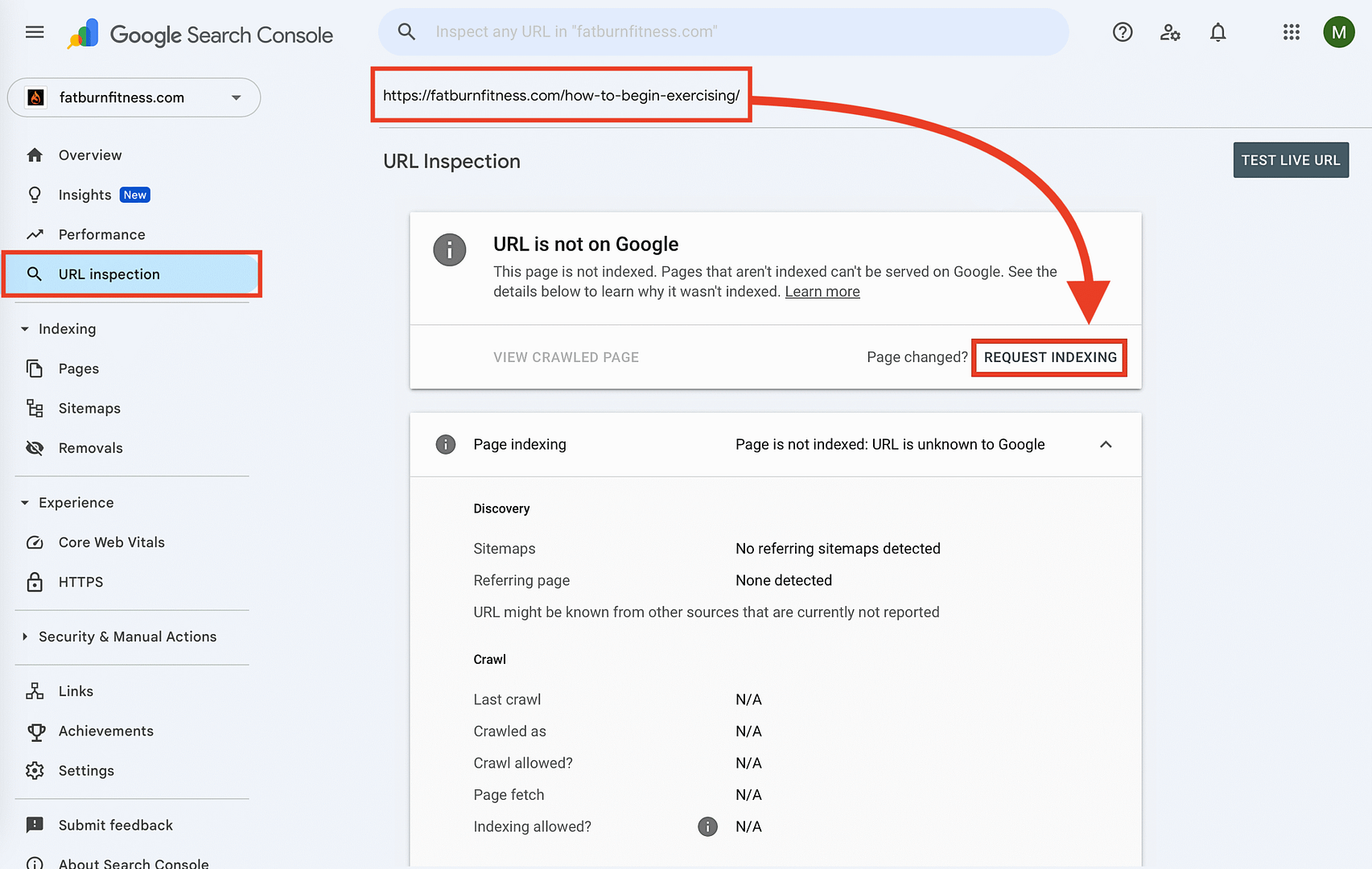
- In the left-hand menu, click on “URL Inspection”.
- Enter the URL you want to submit in the search bar and click “Enter”.
- If the URL is not indexed, you will see an option to request indexing. Click on it.
- Google will then crawl the page and potentially add it to its index.
Benefits of using Submit URL feature:
- Faster Indexing: By submitting URLs directly, you can expedite the indexing process, ensuring your new content appears in search results sooner.
- Control Indexing: You have more control over which pages get indexed by Google, helping you prioritize important content.
- Troubleshooting: If you encounter indexing issues with specific pages, submitting them via this feature can help diagnose and resolve problems.
Conclusion
The Google Search Console Submit URL feature is a valuable tool for website owners looking to improve their site’s visibility on Google. By taking advantage of this feature, you can ensure that your content gets indexed promptly and accurately, ultimately driving more organic traffic to your website.
Make sure to regularly use this feature for new content or important updates to keep your site well-optimized for search engines!
Essential FAQs on Submitting URLs in Google Search Console
- How do I submit a URL to Google Search Console?
- Why should I use the Submit URL feature in Google Search Console?
- Is there a limit to how many URLs I can submit using Google Search Console?
- How long does it take for a submitted URL to be indexed by Google?
- Can I monitor the indexing status of URLs submitted through Google Search Console?
How do I submit a URL to Google Search Console?
To submit a URL to Google Search Console, you can follow a simple process within your Search Console account. First, log in to your Google Search Console account and select the property (website) you want to work on. Then, navigate to the “URL Inspection” section in the left-hand menu. Enter the specific URL you wish to submit in the search bar and press “Enter”. If Google has not indexed the URL yet, you will have the option to request indexing for that particular page. By following these steps, you can efficiently submit URLs to Google Search Console for indexing, ensuring that your content is visible in search results.
Why should I use the Submit URL feature in Google Search Console?
Using the Submit URL feature in Google Search Console is essential for website owners looking to enhance their online visibility and ensure that their latest content is promptly indexed by Google. By submitting specific URLs through this feature, you can expedite the indexing process, allowing your new pages to appear in search results faster. This proactive approach not only helps in controlling which pages are indexed by Google but also aids in troubleshooting any potential indexing issues that may arise. Ultimately, leveraging the Submit URL feature empowers you to take charge of your site’s indexing process, prioritise important content, and drive organic traffic to your website effectively.
Is there a limit to how many URLs I can submit using Google Search Console?
One common query regarding Google Search Console’s Submit URL feature is whether there is a limit to the number of URLs that can be submitted. Google does not explicitly disclose a specific limit on the number of URLs you can submit using this feature. However, it is important to note that Google recommends focusing on submitting high-quality and important URLs for indexing rather than inundating the system with a large volume of URLs. By prioritising key pages and relevant content for submission, webmasters can ensure efficient indexing and better visibility in search results.
How long does it take for a submitted URL to be indexed by Google?
One of the frequently asked questions about Google Search Console’s Submit URL feature is, “How long does it take for a submitted URL to be indexed by Google?” The indexing time for a submitted URL can vary depending on various factors such as the website’s crawl rate, the importance of the content, and Google’s overall workload. In general, Google aims to index new URLs within a few days to a few weeks after submission. However, it is essential to note that there is no fixed timeframe for indexing, and some URLs may get indexed sooner or later than others. Patience is key when waiting for Google to crawl and index your submitted URLs, but regularly monitoring your site’s performance in Google Search Console can provide insights into the indexing progress.
Can I monitor the indexing status of URLs submitted through Google Search Console?
Monitoring the indexing status of URLs submitted through Google Search Console is a common query among website owners and SEO professionals. Fortunately, Google Search Console provides valuable insights into the indexing progress of submitted URLs. By accessing the Index Coverage report within Google Search Console, users can track the status of individual URLs, identify indexing issues, and monitor any changes in their indexation over time. This feature empowers users to stay informed about the visibility of their content on Google search results and take proactive measures to ensure optimal indexing performance.