
SEO Crawler Tool: Find and Fix Website Issues for Better Search Performance
SEO Crawler Tool: What It Is and How to Use One
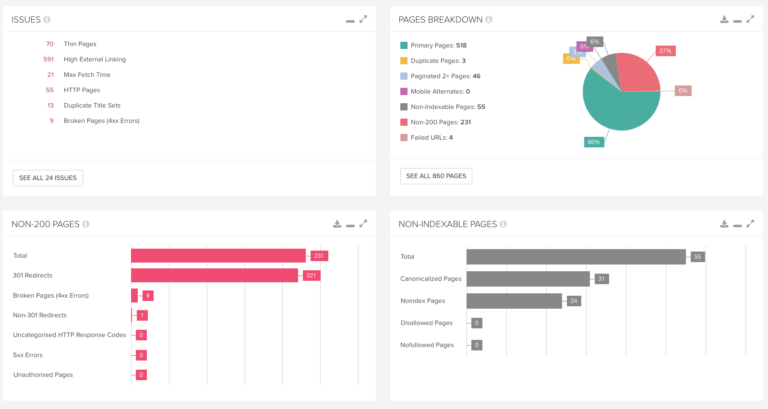
An SEO crawler tool helps you understand how search engines may discover and interpret the pages on your website. It visits pages by following links, much like a search engine crawler, and collects information about their structure, content and technical setup. The results can reveal issues that make a site harder to crawl, index or use.
Whether you manage a small business website or a large online shop, a crawler can make technical SEO checks quicker and more systematic. It does not replace human judgement, but it can help you find problems and decide what to investigate next.
What does an SEO crawler tool do?
An SEO crawler starts from one or more URLs and follows links it can access. Depending on the tool and its settings, it may report details such as:
- Pages that return errors, such as 404 or server error responses
- Redirects, redirect chains and redirect loops
- Missing, duplicated or unusually long page titles and meta descriptions
- Heading structure and page-level content information
- Canonical tags and indexation directives, including noindex tags
- Broken internal and external links
- Pages with few internal links pointing to them
- Image file details and missing alternative text
- URL patterns, page depth and other site architecture information
- Some structured data and technical implementation details
The exact checks vary between tools. Some crawlers also offer JavaScript rendering, sitemap analysis, scheduled crawls or integrations with analytics and search performance platforms.
Why use an SEO crawler?
A crawler can help you build a clearer picture of a website than manual spot-checking alone. It is especially useful when a site has many pages or when changes have been made across templates, navigation or URL structures.
Find technical issues
Crawl reports can highlight broken links, redirect problems, blocked pages and inconsistent metadata. Fixing these issues may improve the experience for visitors and make the site easier for search engines to navigate.
Review site structure
Information about internal links and crawl depth can help you see whether important pages are easy to reach. If key content is buried several clicks from the homepage or receives few internal links, it may deserve a closer review.
Support site migrations and redesigns
Before and after a migration, crawling can help you compare URLs, identify missing pages and check whether redirects have been implemented as intended. It is a useful part of a wider migration process, alongside backups, analytics checks and search performance monitoring.
Monitor changes over time
Regular crawls can make it easier to spot new problems after publishing content, changing templates or updating a content management system. Comparing reports can show whether known issues have been resolved and whether any new ones have appeared.
How to use an SEO crawler tool
- Choose a suitable starting point. Enter the website’s main URL, or provide a sitemap if the tool supports it.
- Check the crawl settings. Review whether the crawler follows robots.txt rules, includes subdomains, renders JavaScript and limits the number of URLs it visits.
- Run the crawl responsibly. Large or frequent crawls can place load on a server. Use sensible limits, particularly on websites you do not own or manage.
- Review the overview first. Look for major patterns, such as large numbers of errors, unexpected blocked pages or a sudden change in the number of URLs found.
- Prioritise findings. Start with issues that affect important pages or many URLs. A missing title on one low-value page may be less urgent than a redirect loop affecting a key section.
- Verify before making changes. Crawler recommendations are clues, not automatic instructions. Check the affected pages and consider the site’s purpose before editing them.
- Re-crawl after updates. Run another crawl to confirm that fixes have worked and have not caused other problems.
How to choose the right crawler
The best SEO crawler tool depends on the size and complexity of your website, your technical knowledge and the tasks you need to complete. Consider the following:
- Crawl capacity: Check how many URLs you can crawl and whether there are limits on projects or scheduled scans.
- JavaScript support: If important content or links are added by JavaScript, look for a tool that can render pages in a browser-like environment.
- Reporting: Clear reports, useful filters and export options make findings easier to share and act on.
- Configuration: The ability to adjust crawl speed, URL rules, user agents and authentication may be important for larger or restricted sites.
- Integrations: Connections with analytics, search console data or other SEO platforms can add context to crawl findings.
- Ease of use and cost: Choose a tool that fits your workflow and budget, rather than paying for features you are unlikely to use.
Common mistakes to avoid
A crawl report can contain a large number of findings, but not every warning is a problem that needs immediate attention. Avoid treating all issues as equally important or making changes solely to improve a tool’s score.
- Do not assume that every crawled URL should be indexed.
- Do not remove pages simply because they have little organic traffic without checking their purpose and value.
- Do not change canonical tags or robots directives without understanding their effect.
- Do not rely on one crawl as a complete SEO audit; crawling does not assess every aspect of content quality, authority or user experience.
- Do not ignore crawl settings. A tool may miss pages that require JavaScript, a login or a different starting URL.
SEO crawling and indexing are not the same
Crawling means discovering and fetching a page. Indexing is the separate process of assessing whether that page should be stored and shown in search results. A crawler tool can help identify technical signals that affect discovery, but it cannot guarantee that a search engine will crawl or index a page.
Search engines make their own decisions based on many factors, including accessibility, content and site signals. Use crawler findings alongside search performance data and a manual review of important pages.
Frequently asked questions
How often should I crawl my website?
It depends on how often your site changes. A small, stable website may only need occasional checks, while a large site that publishes or updates pages frequently may benefit from more regular monitoring. Crawl frequency should be balanced with server capacity and the usefulness of the reports.
Can an SEO crawler tool fix issues automatically?
Most crawler tools identify and organise potential issues rather than fixing them. Some may connect with other systems or offer workflow features, but changes should be reviewed and tested before they are applied.
Can a crawler access every page on a website?
Not necessarily. Pages may be difficult to discover if they have no links pointing to them, require a login, depend on JavaScript or are blocked by configuration. A crawler’s results also depend on its settings and the access it has been given.
Make crawling part of your SEO routine
An SEO crawler tool is a practical way to inspect a website’s technical foundations and uncover issues that might otherwise go unnoticed. Its greatest value comes from using it regularly, interpreting its findings in context and prioritising fixes that matter to visitors and the business. Combine crawling with content reviews, analytics and search performance data for a more complete view of your SEO.
8 Essential Tips for Using an SEO Crawler Tool
- Crawl your site regularly to spot issues early.
- Check robots.txt settings before each crawl.
- Review broken links and fix them promptly.
- Find duplicate titles and meta descriptions.
- Check that important pages are crawlable.
- Monitor redirects for unnecessary chains.
- Review XML sitemaps for errors.
- Compare crawl results to track improvements.
Crawl your site regularly to spot issues early.
Crawl your site regularly to spot issues early, before broken links, redirect errors or accidental changes to important pages affect visitors and search performance. A consistent schedule also makes it easier to compare results over time, prioritise new problems and confirm that fixes have worked. The right frequency depends on how often your site changes, but even periodic checks can help keep its technical foundations in good shape.
Check robots.txt settings before each crawl.
Check your robots.txt settings before each crawl to make sure the tool can access the pages you want to audit. This file may block certain sections of your website, either intentionally or by mistake, so review its rules and configure the crawler to respect them where appropriate. Remember, robots.txt controls crawling, not whether a page is indexed; use the right tools to check indexation separately.
Review broken links and fix them promptly.
Review broken links regularly and fix them promptly to help visitors and search engine crawlers navigate your website smoothly. Use your SEO crawler tool to find links that lead to missing pages or errors, then update them to point to the correct destination, restore the missing page or add a suitable redirect. Pay particular attention to broken links on important pages, as they can disrupt the user journey and make valuable content harder to discover.
Find duplicate titles and meta descriptions.
Use an SEO crawler tool to find pages with duplicate title tags or meta descriptions. These duplicates can make it harder for search engines and visitors to understand how your pages differ, particularly when they appear together in search results. Review each affected page and write a clear, distinctive title and description that accurately reflects its content. Where pages are intentionally similar, check whether they serve different purposes and whether each needs to be indexed.
Check that important pages are crawlable.
Check that your most important pages are crawlable by running an SEO crawler and reviewing whether they can be accessed without errors or blocked by robots.txt rules, noindex directives or other restrictions. Pay particular attention to key service, product and landing pages, and make sure they are linked from relevant parts of your site so crawlers can discover them. A page being crawlable does not guarantee it will be indexed, but it is an essential first step.
Monitor redirects for unnecessary chains.
Monitor redirects for unnecessary chains by checking whether URLs pass through several redirects before reaching their final destination. Each extra step can slow down visitors and make crawling less efficient. Where possible, update links to point directly to the final URL and replace long chains with a single redirect. Re-crawl the site after making changes to confirm that redirects work correctly and no important pages are affected.
Review XML sitemaps for errors.
Review your XML sitemaps with an SEO crawler tool to spot errors such as broken URLs, redirects, duplicate entries or pages that are blocked from indexing. A sitemap should list the canonical URLs you want search engines to discover, so remove outdated or unsuitable entries and ensure the file is accessible and correctly formatted. Once you have made changes, re-crawl the sitemap to confirm it is clean and up to date.
Compare crawl results to track improvements.
Compare crawl results over time to see whether your SEO improvements are working. After fixing issues such as broken links, redirect chains or missing metadata, run another crawl and compare the findings with your earlier results. This helps confirm that the changes have resolved the problems and makes it easier to spot new issues before they affect more pages.