
Keyword Volume Checker: Find Search Demand and Choose Better Keywords
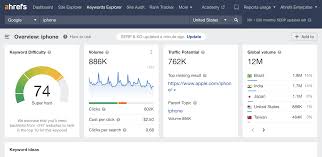
Keyword Volume Checker: How to Find and Use Search Volume Data
A keyword volume checker helps you estimate how often people search for a particular word or phrase. This information can guide your content planning, SEO strategy and paid search campaigns. Used well, it can help you compare keyword ideas and decide which topics are worth investigating further.
However, search volume is only one part of keyword research. A popular keyword is not automatically the best choice for your website. Relevance, competition, search intent and the value of attracting that audience all matter too.
What is a keyword volume checker?
A keyword volume checker is an SEO tool that provides an estimate of the number of searches a keyword receives over a set period, usually per month. Depending on the tool and data source, it may also show related keyword ideas, competition levels, trends and estimated cost per click.
For example, a checker might help you compare a broad phrase such as “running shoes” with a more specific one such as “best running shoes for beginners”. The broader phrase may have more searches, while the longer phrase may indicate a clearer need and face different levels of competition.
Why keyword search volume matters
Search volume gives you a rough indication of demand. It can help you:
- Compare different keyword ideas before creating content.
- Identify topics that people are actively searching for.
- Find specific, lower-volume phrases that may be more relevant to your audience.
- Prioritise pages or topics for further research.
- Understand whether interest in a subject appears to be rising or falling.
Volume estimates can be useful for setting priorities, but they should not be treated as a promise of traffic. A page’s position in search results, its relevance, competing pages and the searcher’s behaviour all affect how many visits it receives.
How to use a keyword volume checker
- Start with a relevant topic. Think about the products, services or questions that matter to your audience.
- Enter a keyword or phrase. A checker may return an estimated monthly search volume and related phrases.
- Compare variations. Look at synonyms, question-based searches and more specific phrases rather than relying on one term.
- Check the location and language. Search demand can vary considerably between countries and regions.
- Review other metrics. Consider competition, trends, search intent and the likely value of the traffic.
- Choose a suitable page or content format. Make sure the page answers the searcher’s need rather than simply repeating the keyword.
How to interpret search volume
Search volume is usually an estimate, not an exact count. Different tools may show different figures because they use different data sources, locations, time periods and calculation methods. Some tools group close variants together, while others report them separately.
It is also helpful to distinguish between a keyword’s average volume and its trend. A seasonal phrase may attract many searches for a short period and very few at other times. A year-round topic may have steadier demand. Looking at trend data can help you plan content for the right time.
High-volume keywords are not always the best choice
High-volume keywords can be attractive, but they often cover broad topics and may be highly competitive. They can also bring visitors whose needs do not match what your website offers.
More specific phrases may have lower search volumes but clearer intent. For instance, someone searching for a particular model, problem or location may be closer to making a decision than someone using a general term. The right choice depends on your audience and the purpose of the page.
Look beyond volume
Use search volume alongside other indicators to make a more balanced decision:
- Search intent: Is the person looking for information, comparing options or ready to take action?
- Relevance: Does the keyword genuinely relate to your website, product or expertise?
- Competition: Are the current results dominated by established websites, or is there room for a useful new page?
- Trend: Is interest stable, seasonal or changing over time?
- Business value: Could attracting this audience contribute to a meaningful outcome?
- Content fit: Can you create a page that answers the query clearly and thoroughly?
Common mistakes to avoid
- Choosing keywords based on volume alone. A large number does not guarantee relevant visits or results.
- Treating estimates as exact figures. Use volume as a guide and compare data from consistent sources.
- Ignoring the search results. Review the pages already ranking to understand what searchers may expect.
- Targeting too many phrases on one page. Keep each page focused on a clear topic and closely related searches.
- Forcing keywords into content. Write naturally and prioritise usefulness, clarity and accuracy.
- Forgetting local differences. Search patterns can vary by country, region and language.
Making keyword volume data useful
A keyword volume checker is most useful as part of a wider research process. Begin with your audience’s needs, gather a range of keyword ideas, and compare their estimated demand with intent and competition. Then create content that provides a genuinely helpful answer.
After publishing, review your website’s performance using analytics and search data. Actual impressions, clicks and conversions can show how your audience responds and help you refine your approach. Over time, this combination of estimates and real-world results can lead to better-informed SEO decisions.
Final thoughts
Keyword search volume can help you understand demand and prioritise topics, but it is not a measure of guaranteed traffic or success. Use a keyword volume checker to generate and compare ideas, then consider relevance, intent, competition and value before deciding what to target. The strongest keyword strategy is built around what people need and what your website can answer well.
Top 10 FAQs on Using Keyword Volume Checkers Effectively
- How do I find the volume of keywords for free?
- How do I search Google for volume keywords?
- How do I check my traffic for keywords?
- What is a good keyword volume?
- How do I check CPC keywords?
- How do I find keyword volume on Google?
- How is keyword volume calculated?
- How do I search bulk keywords for volume?
- How do I check my keyword volume for free?
- How can I get keyword volume for free?
How do I find the volume of keywords for free?
You can check keyword search volumes for free using tools such as Google Keyword Planner, which provides estimates once you set up a Google Ads account, or by trying free keyword research tools that offer a limited number of searches. Enter your keyword, select the relevant country and language, then review the estimated monthly searches and related suggestions. Keep in mind that free tools may show broad ranges or different figures, so treat the results as a guide rather than an exact count, and compare them with search trends and your audience’s needs.
How do I search Google for volume keywords?
To find keyword search volumes related to Google searches, start by entering a topic or phrase into a keyword volume checker and select the country and language you’re interested in. The tool can show estimated monthly searches and related keyword ideas. Google Keyword Planner is another option, although it may require a Google Ads account and often provides ranges rather than precise figures. Treat all volume data as an estimate, then check the search results to understand what people are looking for and whether the keyword suits your content.
How do I check my traffic for keywords?
To check your traffic for specific keywords, use a website analytics or search performance tool to review the queries bringing visitors to your site. In Google Search Console, open the Performance report to see search queries, impressions, clicks and average position; you can filter the data by page, country or date range. Analytics tools can then help you understand what visitors do after arriving. Bear in mind that these figures show actual performance, while a keyword volume checker estimates how often people search for a keyword overall.
What is a good keyword volume?
A good keyword volume depends on your goals, industry and level of competition—there is no single ideal number. High-volume keywords may attract more searches but are often more competitive and broad, while lower-volume, specific phrases can bring visitors with clearer intent. Choose keywords that are relevant to your audience and that you can address usefully, and consider search intent, competition and potential value alongside estimated monthly searches.
How do I check CPC keywords?
To check CPC (cost-per-click) keywords, enter a word or phrase into a keyword research tool that provides CPC estimates, then select the country or region you want to target. The tool will show an estimated cost advertisers may pay for a click, alongside related keyword ideas and, sometimes, competition data. CPC figures are estimates and can vary by location, platform and time, so use them as a guide rather than a fixed price. For SEO research, compare CPC with search volume, relevance and search intent; a higher CPC may suggest commercial interest, but it does not guarantee that a keyword will be valuable for your website.
How do I find keyword volume on Google?
To find keyword volume on Google, use Google Keyword Planner, available through a Google Ads account. Open the tool, choose “Discover new keywords” or “Get search volume and forecasts”, then enter your keywords and select the relevant location and language. Keyword Planner shows estimated average monthly searches, often in ranges unless the account meets Google’s advertising data requirements. Treat these figures as estimates: they can vary by date range, location and close keyword variants. You can also compare them with data from Google Search Console, which shows impressions for searches your own website already appears for, though it does not provide the full search volume for every keyword.
How is keyword volume calculated?
Keyword volume is usually estimated from search engine data, such as the number of times a term is searched over a recent period, commonly averaged across a month. Tools may combine data from different sources, group similar keyword variations or apply statistical models, so figures can vary between providers. Treat the result as an estimate rather than an exact count, and check the selected location, language and date range when comparing keywords.
How do I search bulk keywords for volume?
To check search volume for keywords in bulk, add or upload a list of phrases to a keyword volume checker that supports bulk searches. Choose the target country, language and search network where available, then run the check to view estimated volume and any related metrics for each keyword. For the clearest comparison, use consistent settings and organise the results by volume, relevance or competition. Remember that figures are estimates, so use them as a guide alongside search intent and your audience’s needs.
How do I check my keyword volume for free?
You can check keyword volume for free using an SEO tool that offers keyword research or search-volume estimates. Enter your keyword, choose the relevant country and language, then review the estimated monthly searches and any related suggestions. Free tools may limit the number of searches or provide rounded estimates, so treat the figures as a guide rather than an exact count. Compare a few keyword variations and consider search intent and competition as well as volume.
How can I get keyword volume for free?
You can get keyword volume for free using tools such as Google Keyword Planner, which provides search estimates after you create a Google Ads account, or by trying free keyword research tools that offer a limited number of searches. Google Trends can also help you compare interest over time, although it shows relative popularity rather than exact monthly search figures. Keep in mind that free tools may provide broad ranges or estimates, so use the data as a guide and consider relevance, search intent and competition as well as volume.